
第三方系统有两种方式和乐创者单点登录整合,如果是java系统可以使用sdk方式,其他系统可以使用认证接口的方式。
1 原理
(1)登录原理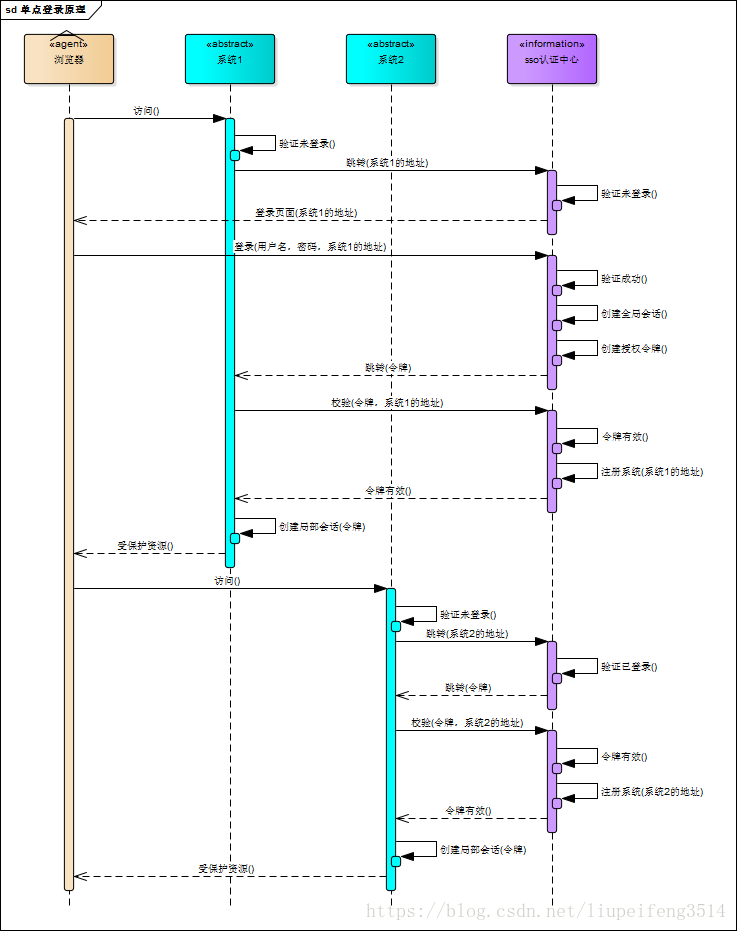
(2)注销原理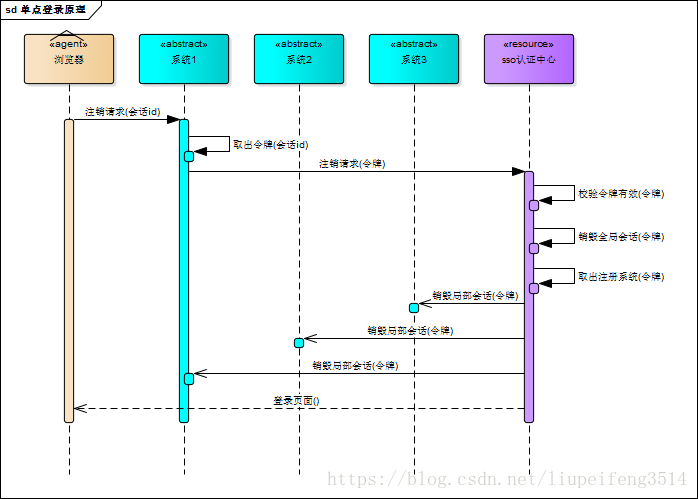
2 调用SDK
(1)搭建工程
导入hc-sso-client-6.x.x.jar 或 hc-sso-client-7.x.x.jar包。
下载地址:hc-sso-client-6.x.x.jar
(2)配置web.xml
代码示例
<filter>
     <filter-name>SSOClientFilter</filter-name>
     <filter-class>com.datanew.sso.client.SSOClientFilter</filter-class>
     <init-param>
          <param-name>appDomain</param-name>
          <param-value>外部系统域名</param-value>
     </init-param>
     <init-param>
          <param-name>ssoServer</param-name>
          <param-value>LCZ服务域名</param-value>
     </init-param>
</filter>
<filter-mapping>
     <filter-name>SSOClientFilter</filter-name>
     <url-pattern>/*</url-pattern>
</filter-mapping>
参数解释
参数名 |
必选参数 |
说明 |
|---|---|---|
| appDomain | 是 | 外部系统域名 |
| ssoServer | 是 | LCZ服务器域名 |
| tenantIdent | 否 | 租户标识 |
| errorPath | 否 | 登陆失败后跳转的页面 |
(3)获取用户信息
通过token获取用户
SSOClientSession.getInstance().getUserData(token);通过request获取用户
SSOClientSession.getInstance().getUserData(request);通过当前线程获取用户
SSOClientSession.getInstance().getUser();3 调用认证接口
(1) 请求登录
http(s)://{LCZ服务器域名}/lczsso/login请求方式:GET
传参
参数名 |
类型 |
必选参数 |
说明 |
|---|---|---|---|
| redirect_to | String | 是 | 请求用户后要重定向的第三方应用地址 |
传参示例
http://127.0.0.1:8080/lczServer/lczsso/login?redirect_to=http://localhost:9000/成功重定向URL
{第三方应用地址(redirect_to)}?userData={UserData}&ssoType={lcz标记}成功重定向示例
http://localhost:9000/?token=LCZ_TOKEN_9B4DB4752D56106768564DE65C63F00A_F77FD37A-EEB9-4A65-AFCE-F6B84C695A3A&ssoType=lcz
失败重定向URL
{第三方应用地址(redirect_to)}?msg={错误信息}&errCode={错误编码}&ssoType={lcz标记}失败重定向示例
http://localhost:9000/?msg=未验证的外部系统&errCode=SSOService_vaildRedirectTo_00002&ssoType=lcz
(2) 授权令牌请求用户
http(s)://{LCZ服务器域名}/lczsso/user
请求方式:GET
传参
参数名 |
类型 |
必选参数 |
说明 |
|---|---|---|---|
| token | String | 是 | 授权令牌 |
| redirect_to | String | 是 | 请求用户后要重定向的第三方应用地址 |
传参示例
http://127.0.0.1:8080/lczServer/lczsso/user?token=LCZ_TOKEN_9B4DB4752D56106768564DE65C63F00A_F77FD37A-EEB9-4A65-AFCE-F6B84C695A3A&redirect_to=http://localhost:9000/成功重定向URL
{第三方应用地址(redirect_to)}?userData={UserData}&ssoType={lcz标记}成功重定向示例
http://localhost:9000/?userData={"createTime":1562999709693,"invalidTime":1563003309693,"lastModifyTime":1562999709693,"userAlias":"张三","userId":"10000","userName":"zhangsan","uuid":"F77FD37A-EEB9-4A65-AFCE-F6B84C695A3A"}&ssoType=lczUSERDATA签名认证
对USERDATA数据和Token进行MD5签名认证
JAVA代码示例
String tempToken = HttpUtil.getCookieValue(request, SSOClientConstant.TEMP_COOKIE_KEY);
if(EmptyVeify.string(tempToken)){
    error("SSOClientService_userData_00001", "令牌丢失", response);
    return;
}
userData = URLDecoder.decode(userData, CharsetEnum.UTF_8.getName());
if(tempToken.startsWith(String.format("LCZ_TOKEN_%s", DigestUtils.md5DigestAsHex(userData.getBytes(CharsetEnum.UTF_8.getCharset())).toUpperCase()))){
    ssoClientSession.putUserData(tempToken, userData, response);
    Cookie cookie = HttpUtil.cookie(SSOClientConstant.TEMP_COOKIE_KEY, null, request.getContextPath(), 1);
    response.addCookie(cookie);
    String redirectTo = redirectToAddParam(request, request.getRequestURI());
    response.sendRedirect(redirectTo);
}else{
    Cookie cookie = HttpUtil.cookie(SSOClientConstant.TEMP_COOKIE_KEY, null, request.getContextPath(), 1);
    response.addCookie(cookie);
    error("SSOClientService_userData_00002", "用户数据验证失败", response);
}
失败重定向URL
{第三方应用地址(redirect_to)}?msg={错误信息}&errCode={错误编码}&ssoType={lcz标记}失败重定向示例
http://localhost:9000/?msg=无效的token&errCode=SSOService_tokenGetUserData_00001&ssoType=lcz(3) 注销用户
URL格式
http(s)://{LCZ服务器域名}/lczsso/logout
请求方式:GET
(4) 点对点认证
http(s)://{LCZ服务器域名}/lczsso/oneToOne/login
请求方式:POST
传参
参数名 |
类型 |
必选参数 |
说明 |
|---|---|---|---|
| userName | String | 是 | 用户登录名 |
| password | String | 是 | 用户密码 |
| tenantIdent | String | 否 | 租户标识 |
传参示例
userName:张三
password:xxxxxxxxxxxxxxxxxxxxx
tenantIdent: 1
备注:密码经过MD5加密
成功响应:
{
    "success":true,
    "content":{
        "createTime":1562999709693,
        "invalidTime":1563003309693,
        "lastModifyTime":1562999709693,
        "userAlias":"张三",
        "userId":"10000",
        "userName":"zhangsan",
        "uuid":"F77FD37A-EEB9-4A65-AFCE-F6B84C695A3A"
    }
}
失败响应:
{
    "success":false,
    "msg":"错误原因",
    "errCode":"错误码"
}
(5) UserData
参数说明
参数名 |
类型 |
必选参数 |
说明 |
|---|---|---|---|
| userName | String | 是 | 用户登录名 |
| userId | String | 是 | 用户唯一标识 |
| userAlias | String | 是 | 用户显示名字 |
| lastModifyTime | Long | 是 | 用户信息最后修改时间 |
| other | Map | 否 | 用户其他信息 |
| roles | List | 否 | 用户角色列表 |
| menus | List | 否 | 菜单列表 |
示例
{
  "userId":"1",
  "userName":"zhangsan",
  "userAlias":"张三",
  "lastModifyTime":1456677787777,
  "other":{},
  "roles": [{
    "id":"roleId",
    "name":"roleName"
  }],
  "menus": [{
    "id":"menuId",
    "name":"menuName"
  }]
}
(6) 备注
除点对点认证回参外,所有的参数传递都要经过URLDecoder编码
字符集:UTF-8
作者:柳杨 创建时间:2023-08-08 14:35
最后编辑:柳杨 更新时间:2026-09-20 17:02
最后编辑:柳杨 更新时间:2026-09-20 17:02
———— 本文档对您有帮助吗?或有错误,恳请 反馈 ————
 上一篇:无
上一篇:无